Personal AI for the Rest of Us: A Practical Guide
Personal AI is no longer a science fiction fantasy reserved for Tony Stark. It is a practical, everyday tool that helps you organize notes, plan family trips, and understand complex topics broken down just for you. Let me show you how to use an assistant that understands your life.


TL;DR: Most AI content is either selling you something or scaring you. This newsletter does neither. I simply break down how regular people can use AI today without coding, without confusion, and without compromising their values. Real examples. Real steps. Real results.
The Problem With Most AI Content
I want to start with a confession. Every week I read dozens of articles about AI, and most of them make me uncomfortable. Not because they're wrong. Because they're useless for normal humans.
Half of them sound like this: "AI will steal your job, manipulate your kids, and probably end civilization. Here are 47 reasons to panic." The other half sound like this: "Buy our AI tool for only $99/month! Transform your business overnight! This is the most important moment in human history." Neither one helps you figure out what to actually do with AI on a Tuesday afternoon.
For the past fifty years, truly harnessing computer technology required speaking the machine's language. That era is over. AI is the first technology that speaks our language. But most of the people writing about AI are either selling you something or terrifying you (or trying to predict a future they can't actually see.)
What's missing is the middle ground: practical guidance for regular people who just want to use personal AI without a computer science degree.
That's where you come in.
The whole purpose of my newsletter is to move away from this Doom or Zoom loop, and give practical advice that can help normal people. Like us.
What You Can Actually Do With AI (Starting Right Now)
Forget the hype. Forget the fear. Here are four things you can try this week using free AI tools, with exact steps anyone can follow.
Example 1: Turn Meeting Notes Into Action Items
The scenario: You just sat through an hour-long conference call. Your notes are a mess. You need to know what you're supposed to do next.
The old way: Spend 20 minutes re-reading your notes, trying to remember who said what, writing a summary email, hoping you didn't miss anything important.
The AI way:
- Go to ChatGPT (free version works fine)
- Paste your messy notes
- Type: "Extract all action items from these meeting notes. Tell me who's responsible for each one and when it's due."
- Wait 10 seconds
What you get back: A clean list of who's doing what by when. No interpretation needed. No guesswork.
Too much work? Record your meeting using the Voice Notes app on your iPhone running iOS 26. Then find that recording and press the three dots (...) on the right side and tap "Copy Transcript"
Now go to Step 2 above and paste the text. Cool, right?
What AI is good at here: Pattern recognition. It sees "Sarah will send the proposal by Friday" buried in three pages of notes and pulls it out. This is what large language models were designed for.
What AI is not good at: Knowing if Sarah actually should send that proposal, or if it's a good idea, or if Friday is realistic. That's still your job.
Example 2: Research Anything Without Falling Down a Rabbit Hole
The scenario: Your doctor mentions a medication. You want to understand what it does without spending two hours on WebMD convincing yourself you have twelve rare diseases.
The old way: Google it, click six links, read contradictory information, end up more confused than when you started.
The AI way:
- Go to Perplexity.ai (free, no account needed)
- Type: "Explain [medication name] in plain English. What does it do? What are the common side effects?"
- Get a clear summary with sources linked. Here it is, for Hydrochlorothiazide.
What AI is good at here: Synthesizing information from multiple sources and explaining it in plain language. It reads faster than you do and pulls out the relevant parts.
What AI is not good at: Medical advice. Always verify important health information with your actual doctor. AI doesn't know your medical history. (At least not yet.)
Example 3: Plan Something Complex in Minutes Instead of Hours
The scenario: You're planning a weekend trip. You need to coordinate travel, lodging, activities, and meals. You have dietary restrictions. Your spouse hates crowds.
The old way: Open 47 browser tabs. Compare hotel prices. Check restaurant reviews. Build a spreadsheet. Realize you forgot to check if the museum is open on Sundays. Start over.
The AI way:
- Go to Claude.ai or ChatGPT
- Type exactly what you need: "Plan a weekend trip to Portland, Maine. Two adults. One is gluten-free. We hate crowds. Budget $800 total. Want hiking, good seafood, and one museum."
- Get a complete itinerary in 30 seconds. Here is the above from ChatGPT
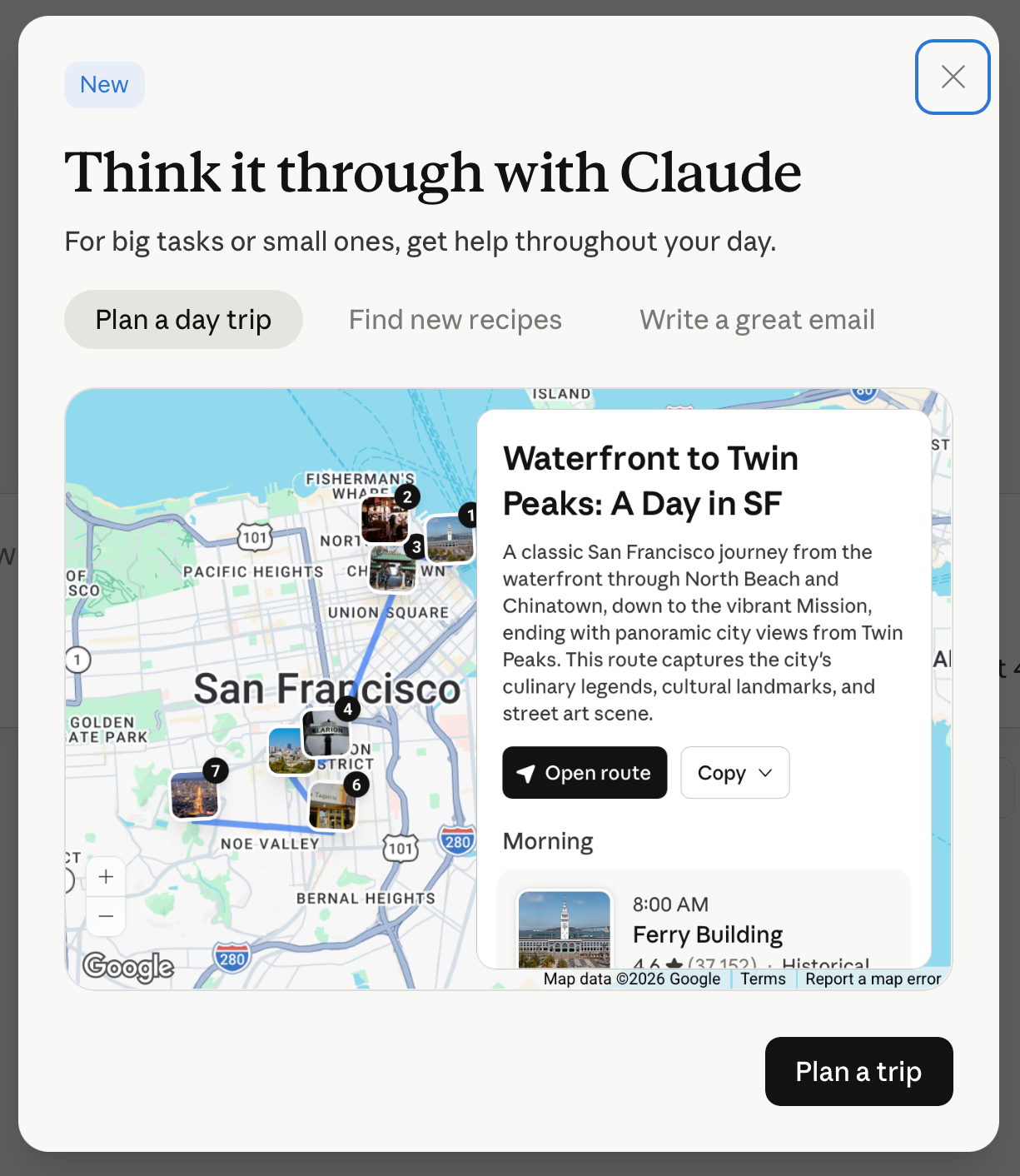
What AI is good at here: Combining constraints. It knows gluten-free restaurants AND hiking trails AND crowd patterns. It does in seconds what would take you an hour of cross-referencing.
What AI is not good at: Knowing if you'll actually like the restaurant it suggests. Read the reviews yourself. Trust your gut (pun!)
Example 4: Learn Something New Without Taking a Course
The scenario: You want to understand how your home's electrical panel works. Not become an electrician. Just understand it.
The old way: Watch a 45-minute YouTube video that assumes you already know what a circuit breaker is. Get lost halfway through.
The AI way:
- Go to Gemini.google.com
- Type: "I'm a complete beginner. Explain how a home electrical panel works like I'm twelve years old. Use analogies to things I already understand."
- Ask follow-up questions when you're confused. Here is that answer, courtesy of Gemini.
Pro Tip: Ask ChatGPT Images 2.0 to illustrate something that is difficult for you to understand, with a prompt like this: "Create a simple diagram showing me how a home electrical panel works like I'm twelve years old."
You'll get something like the following. Click the image to try it yourself.
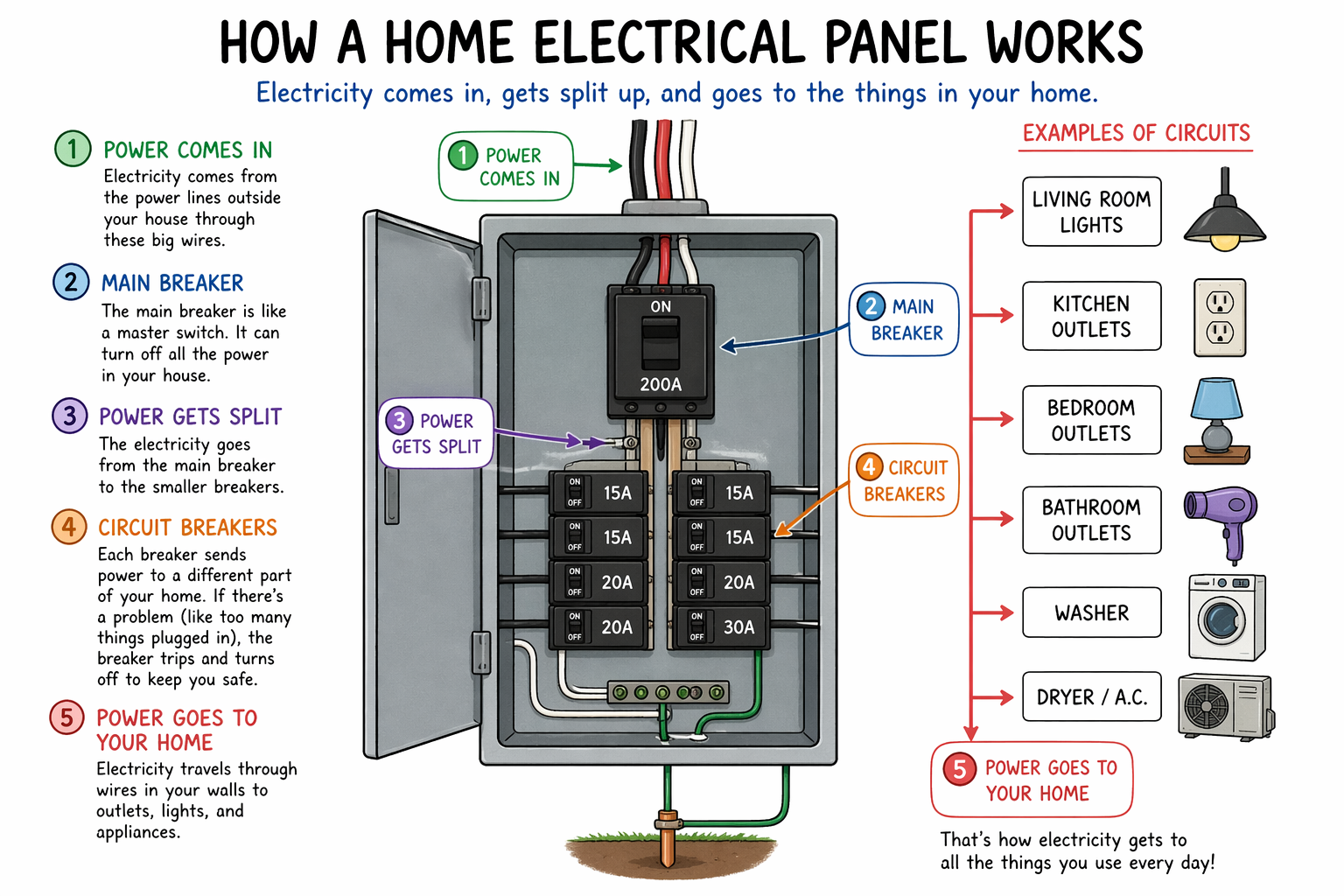
What AI is good at here: Adjusting explanations to your level. It never gets impatient when you ask "wait, what's voltage again?" for the third time.
What AI is not good at: Telling you if it's safe to flip that breaker yourself. When in doubt, call a professional.
What NOT to Use AI For
Here's the honest part most AI evangelists skip: AI is not good at everything. In fact, it's terrible at some very important things.
Don't use AI for:
- Anything where being wrong has serious consequences. Medical decisions. Legal advice. Financial planning. AI can help you research, but the final call needs a human expert who knows your specific situation.
- Anything requiring real judgment about people. AI doesn't understand human relationships. Don't ask it whether you should break up with someone or fire an employee. If AI is your only choice, you are doing it wrong.
- Creative work where your voice matters. AI can help you brainstorm, but if you're writing a wedding toast or a eulogy or anything deeply personal, those words need to come from you. Seriously.
- Anything requiring recent, specific local knowledge. AI's training data has a cutoff date. It probably doesn't know which restaurants just opened in your neighborhood or what happened at last night's city council meeting. It certainly doesn't know what happened outside your door. So do that stuff yourself.
The rule is simple: Use AI to save time on research and synthesis. Use humans for decisions that matter.
The OpenClaw Revolution
All the tools I mentioned run in the cloud on a giant data center somewhere you can't find. But OpenClaw is different. Yes, it can use those large language models like Claude 4.6 or GPT-5.4 running in those data centers, but it can also use the computing power of your own device - the one you're likely reading this newsletter on right now.
OpenClaw is a personal AI tool that lives on your local machine. It has persistent memory, it understands your private files, and it grasps the specific context of your daily life. It does not serve millions of users at once. It works only for you.
We are beginning to move past the one-size-fits-all era of chatbots and entering an age where your computer truly understands you. Should I create an entire post about how to set up OpenClaw? If so, please say so in the comments below, or read this short primer, or watch the video at the bottom of that page where I demonstrate "Storm" - my very own 3-month old personal AI.
Why This Moment Matters
The question isn't whether AI will change how you work and create. It already is. The question is whether you'll use it intentionally or let it pass you by.
That's not hype. That's not fear. That's just what's happening.
This isn't about AI getting smarter at answering questions. It's about AI finally learning to work the way humans actually work: recognizing patterns, remembering context, taking initiative on routine tasks so you can focus on what actually requires your judgment.
The technology that changes everything isn't the one that makes hard things slightly easier. It's the one that makes impossible things possible for people who couldn't do them before. That's what happens when tools finally adapt to us instead of the other way around.
Welcome to the Digital RenAIssance.
Do Just One Thing for Me
Here's what I want you to do this week: Pick one of the examples above and actually try it. Not "think about trying it." Not "sounds interesting." Actually open the website and type something.
If you've been on the sidelines because AI feels too technical or too complicated or too much like something for other people, I'm telling you: it's not. It's a tool. Like a calculator. Like a search engine. Useful for some things. Useless for others. Worth learning.
The era of "I can't do that because I don't know how" is over. What will you do now that Personal AI is here to help?
Steve Chazin makes AI make sense. After three decades leading tech teams at companies like Apple and Salesforce, he's on a mission to show regular people how to use AI without fear or confusion. Welcome to the Digital RenAIssance. stevechazin.com
