A 4 MB Teleprompter That Knows What You Haven't Said Yet
You can give your presentation perfectly and still leave the room wishing you had said the one thing that mattered. So I built a digital stagehand to make sure you say what you came to say.

I originally built Tellie, a Mac teleprompter, in three days while my granddaughter Ellie napped. That was back in May. Since then I've spent a lot more time learning what a teleprompter can and can't tell you about a talk. It can follow your voice. It can tell where you are in the text when you skip ahead or wander off and return. Other prompters do some of that too.
But none of that tells you whether the audience heard what mattered.
Following The Words Is Not The Same As Following The Point
Think of a stage manager with a cue sheet. They don't have to memorize your speech. They do need to know that the sponsor name must be read exactly, the price must be said somewhere, and the closing thought can't be lost when the clock runs short.
I wanted that kind of help. The 3 a.m. idea that became Stagehand was simple to say and surprisingly hard to build: what if the prompter knew what I hadn't said?
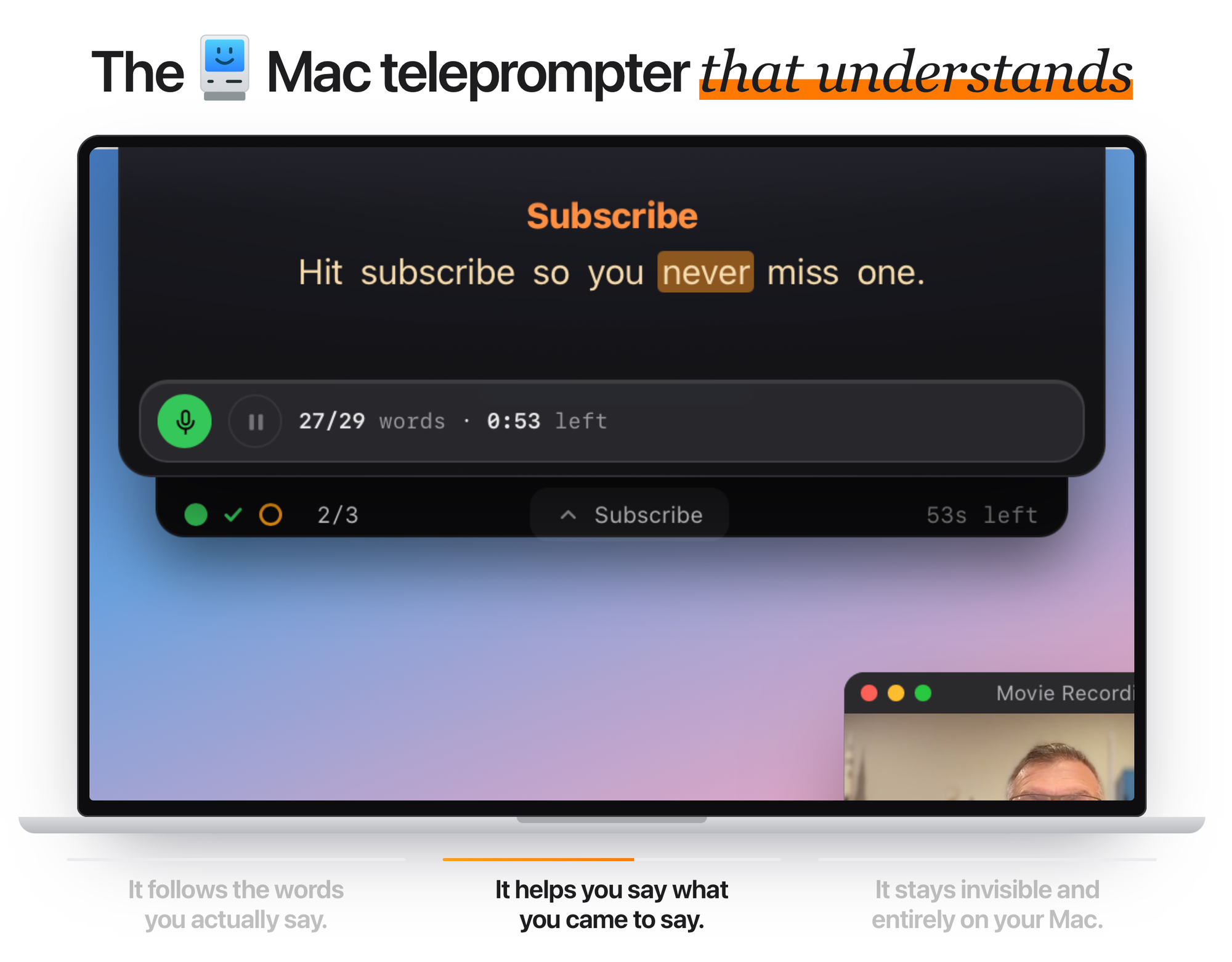
Here is the less magical answer. I tell it what matters. A simple hashmarked section in the script means "I need to cover these words." A key: phrase means "I need to make this point, even if I never read this paragraph." As I speak, Tellie compares the words it hears with those marks and my place in the script. It checks off what I've covered and warns me when a marked section may not fit in the time left.
With a key phrase for each point I need to land, Tellie becomes an unprompter. I can stop following the script's order and talk through those points as the moment takes me. Stagehand checks them off in any order, as long as I say the chosen phrase or one of its alternatives.
The distinction matters. If I write key: book a demo, schedule a demo, I can talk around the line and still earn credit when I say either phrase. I cannot say something completely different and expect Tellie to understand that I meant the same thing. It doesn't read minds, and it doesn't send my speech to a cloud chatbot to guess at my intentions. The words are recognized on my Mac. The whole app is 4 MB. The speech recognition happens on my Mac - local-first, zero-LLM, nothing leaves the machine.
The Best Interface Was Never an Interface
When we first tried to show what Stagehand knew, we built badges, panels and marks in the margin. They seemed useful until I tried them on my Mac. In a real take, each one pulled my eyes away from the words and toward the camera's worst enemy: distraction.
I remember buying lemons at Wegmans when the answer hit me. Stop putting the intelligence in the UI. Put it in the thing the speaker already owns: the script.
Stagehand works because I mark a small number of obligations before the take. If everything is marked important, nothing is. A ## ! heading identifies a must-cover passage. A > key: line anchors a point I can say in my own words, as long as I speak the chosen phrase or one of its alternatives. During the take, the marks turn into progress and a runway warning, not another screenful of controls. Afterward, Take Coach can tell me what I covered, what I missed, and one thing to sharpen next time.
That promise has boundaries. A key phrase can be misheard; an unmarked insight can be brilliant; checking off a point doesn't prove the audience understood it. A person still has to write the talk, choose what matters and decide whether the take works. I wouldn't want the software to take that judgment away.
The first teleprompters solved the problem of looking into a camera while reading words. Mine started there too. Now I'm trying to solve the next problem: staying with a thought while sounding like myself.
What would you mark as the one point you couldn't leave a room without making?
Welcome to the Digital RenAIssance.
About the Author: Steve Chazin builds Tellie, the Mac teleprompter that understands, and writes about making AI make sense for the rest of us.
