How to Put AI to Work for You
Imagine you had a full-time assistant who never sleeps, costs nothing, and is available right now. What would you ask them to do first?


My wife knows this, and now you do too.
I always believed that I would know I had achieved success in my career when I finally reached a level that required a dedicated executive assistant. For one point in my career while working at Symantec and Cisco I did achieve that milestone, and her name was Angela. She took so much work off my plate that I could focus on building a great team and great products. I miss working with Angela almost every day.
Fast forward to 2026, and you now have your own assistant. It might never be as thoughtful as Angela, but it's free, and it never sleeps.
Most people hear "AI" and either tune out completely or feel that familiar knot in their stomach about falling behind because they don't truly understand AI. But you don't need to understand how AI works to use it any more than you need to know how electricity works to benefit from your espresso machine. You just need to know what to ask for.
Why You're Avoiding AI (And Why That's Actually Normal)
The real barrier isn't that you're not technical enough. It's not that you're afraid of looking incompetent. It's that most AI content doesn't show you how this fits into your actual Tuesday afternoon when you're trying to run the rest of your life.
You're stuck between two extremes. Half the articles warn you that AI will steal your job and probably end civilization. The other half are sales pitches for $99/month tools that promise to transform your business overnight. Neither one helps you with the messy reality of your inbox or your children's schedules.
Here's the shift I want you to make: Stop trying to "learn AI." Start thinking like someone who just hired an assistant. What would you delegate first? That pile of notes from yesterday's call? The research for your vacation? The email you've been putting off for three days?
That's your entry point. Not understanding neural networks. Not reading glossaries of technical terms (although here is one in case you're curious). Just figuring out what you'd hand off if someone smart and tireless was sitting next to you right now.
Your Assistant Is Already Here (And It's Free)
You don't need to buy anything. You don't need to learn to code. You don't need to understand how it works under the hood.
Go to ChatGPT.com, Claude.ai, or Gemini.google.com. Create a free account. That's it. No installation. No configuration. No credit card. You're done.
Here's the mental model that makes everything click: This is a person who can read, write, summarize, and explain things. Treat it like you would a smart intern who needs clear instructions. You wouldn't hand an intern a pile of papers and your credit card and say "do something with this." You'd say "read these meeting notes and tell me what I need to do next."
Same thing here. Your AI assistant is incredibly capable, but it needs you to be specific about what you want.
And here's something cool: You can now use tools like Muse, Instinct, or Dots that make this even simpler. They're designed specifically for people who want an assistant without the learning curve and only know how to chat.
Three Things You Can Do Right Now
Let me show you exactly how this works with real examples. No theory. Just tasks you probably need to do this week.
Turn your messy meeting notes into action items. Open your AI assistant. Paste in your notes from that conference call where you tried to keep up while everyone talked over each other. Then type: "What are my action items from these notes?" Hit enter. Thirty seconds later, you have a clean list of what you need to do, who you need to follow up with, and what the deadlines are. The notes you would have spent twenty minutes deciphering are now a simple checklist.
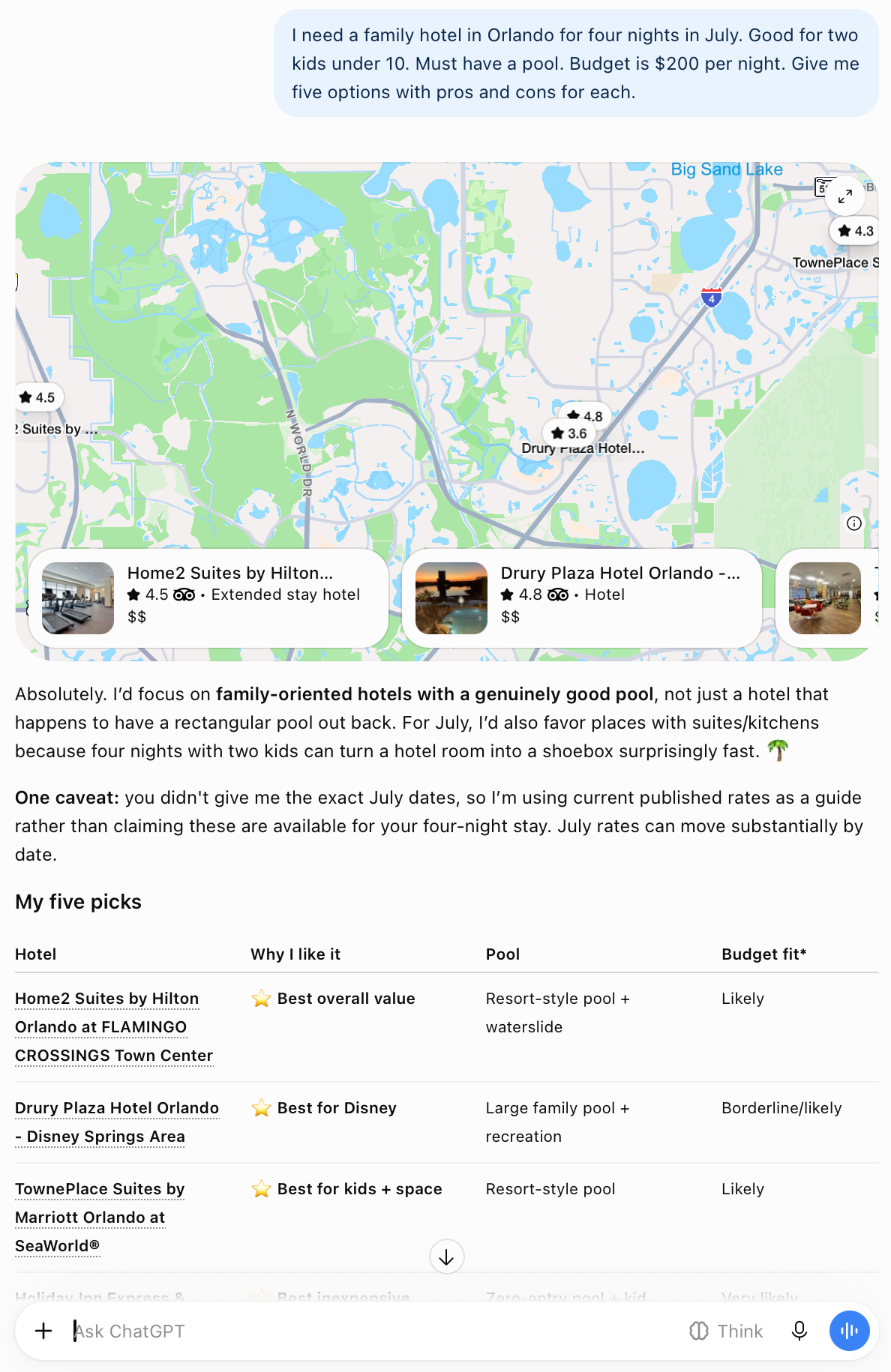
Plan your family vacation without opening 47 browser tabs. Instead of Googling "kid-friendly hotels Orlando with pool" and clicking through endless results, ask your assistant: "I need a family hotel in Orlando for four nights in July. Good for two kids under 10. Must have a pool. Budget is $200 per night. Give me five options with pros and cons for each." You get a formatted list with everything you need to make a decision. You're not trusting it blindly. You're using it to do the initial research legwork so you can focus on choosing.
Understand something confusing. Your doctor sent test results with terms you don't recognize. You got a legal document about your lease renewal. You read a news article about economic policy and half the sentences lost you. Copy the confusing part. Paste it into your assistant. Type: "Explain this like I'm not an expert." What comes back is the plain-English version. The jargon translated. The concept broken down. It's like having someone smart sit next to you and walk you through it.
Notice the pattern here? These aren't AI tricks. They're normal tasks you already do. You're just doing them faster and with less frustration.
The Only Two Skills You Need
You don't need to take a course. You need two skills, and you probably already have them.
Skill one: Ask clearly. Tell your assistant what you need and what format you want it in. "Give me five bullet points" works better than "help me with this." "Write a friendly email declining this invitation" works better than "I need to say no to something." The more specific you are, the better the result. But here's the thing: even vague requests usually get you somewhere useful. You can always clarify and try again.
Skill two: Treat it like a first draft. Your assistant gets you 80% of the way there. It does the heavy lifting. But you still need to read what it gives you, edit it to sound like you, and make sure it's actually right. Think of it as a really good starting point, not the finished product.
What you don't need: You don't need to understand how neural networks work. You don't need to know what "transformer models" are. You don't need to know how your executive assistant arranges your flights to give a great presentation to your staff in China.
What Happens When You Actually Start
I know it feels terrifying if you believe you have to master a new branch of computer science. Yet it's incredibly liberating when you realize you just have to ask for help.
You stop seeing AI as this abstract technology trend that tech people talk about or fear. You start seeing it as a tool that just saved you an hour. The research that would have taken you all afternoon? Done in ten minutes. The concept you couldn't quite grasp? Explained clearly.
And then you start noticing other places where your assistant could help. That trip itinerary you need to organize. That recipe you want to adapt because someone's allergic to gluten. That summary of the news story you want to send your mom without forwarding her a dozen links.
The mental list of "things I'll get to eventually" suddenly becomes "things I could knock out right now."
The more you use it, the better you get at asking for what you need. It's like learning to delegate to any new assistant. The first few times feel awkward. You're not sure how much detail to give. You're not sure if you're asking the right way. But after a week of using it for real tasks, you develop an instinct for it.
So go try it. Pick one thing from this article. Spend five minutes. Paste in those meeting notes, ask about that trip, request that explanation. See what happens.
You don't need a computer science degree to reclaim your Tuesday afternoon. Stop worrying about knowing how it works, and just hand off the work.
About the Author
Steve Chazin makes AI make sense. After three decades leading tech teams at companies like Apple and Salesforce, he's on a mission to show regular people how to use AI without fear or confusion. No hype. No doom. Welcome to the Digital RenAIssance.
If this helped, subscribe at stevechazin.com for weekly updates. And if you know someone who's trying to make sense of AI, forward this to them. We're all learning this together.
